
Quick Summary
Electric gate troubleshooting helps homeowners quickly identify and resolve the root causes of unresponsive, jammed, or reversing automated driveway gates. Technical experts at Ironworks Gate Co. emphasize that while basic power resets, sensor cleanings, and track clearing are safe for DIY maintenance, internal control board diagnostics and high-voltage repairs require professional intervention. Readers will understand step-by-step diagnostic procedures, manual release protocols, and how to schedule an on-site assessment for complex electrical and mechanical failures.
Electric Gate Troubleshooting: Fast Fixes for Stuck Gates
You press your remote button to pull out of the driveway in the morning, and nothing happens. Or the gate shudders, rolls two feet, and stops dead across the driveway. When an automated entry system acts up, electric gate troubleshooting helps find the root cause quickly to keep your property secure.[4]
Safety comes first whenever diagnosing automated equipment. While a California Senate Judiciary Committee analysis noted that current, complete statistics for all automatic gate injuries or fatalities are not readily available nationwide or statewide, historical incident logs clearly show real-world risks. The U.S. Consumer Product Safety Commission (CPSC) uses the National Electronic Injury Surveillance System (NEISS), a national probability sample of U.S. and territorial hospitals, to estimate product-related emergency department visits. Historical CPSC estimates from past surveillance reporting periods indicate thousands of gate-related emergency room visits, representing historical estimates rather than current annual totals, with documented injuries to the head, neck, arms, and hands caused by entrapment and impact points. Never attempt repairs near moving swing arms or drive chains while the system is powered, and never bypass safety devices.[1]
Important Safety Stop Condition: If the gate can close unexpectedly, has failed safety devices, is difficult to move manually, or has damaged structural or electrical parts, keep people and vehicles clear and call a qualified professional.[3]
Fast Diagnostic Guide: How to Troubleshoot an Electric Gate
According to Ironworks Gate Co., when an automated driveway gate stops responding, the problem usually traces back to interrupted electrical power, physical obstructions, sensor issues, or mechanical resistance along the track or hinges. Follow these three quick checks before calling a technician.
- Verify incoming electrical power: Check your main electrical sub-panel for tripped breakers, and test any outdoor GFCI outlets wired upstream of the gate operator.
- Inspect and wipe optical sensors: Dirt, cobwebs, condensation, or direct sunlight can obstruct safety sensors, causing the system to detect a false obstruction.
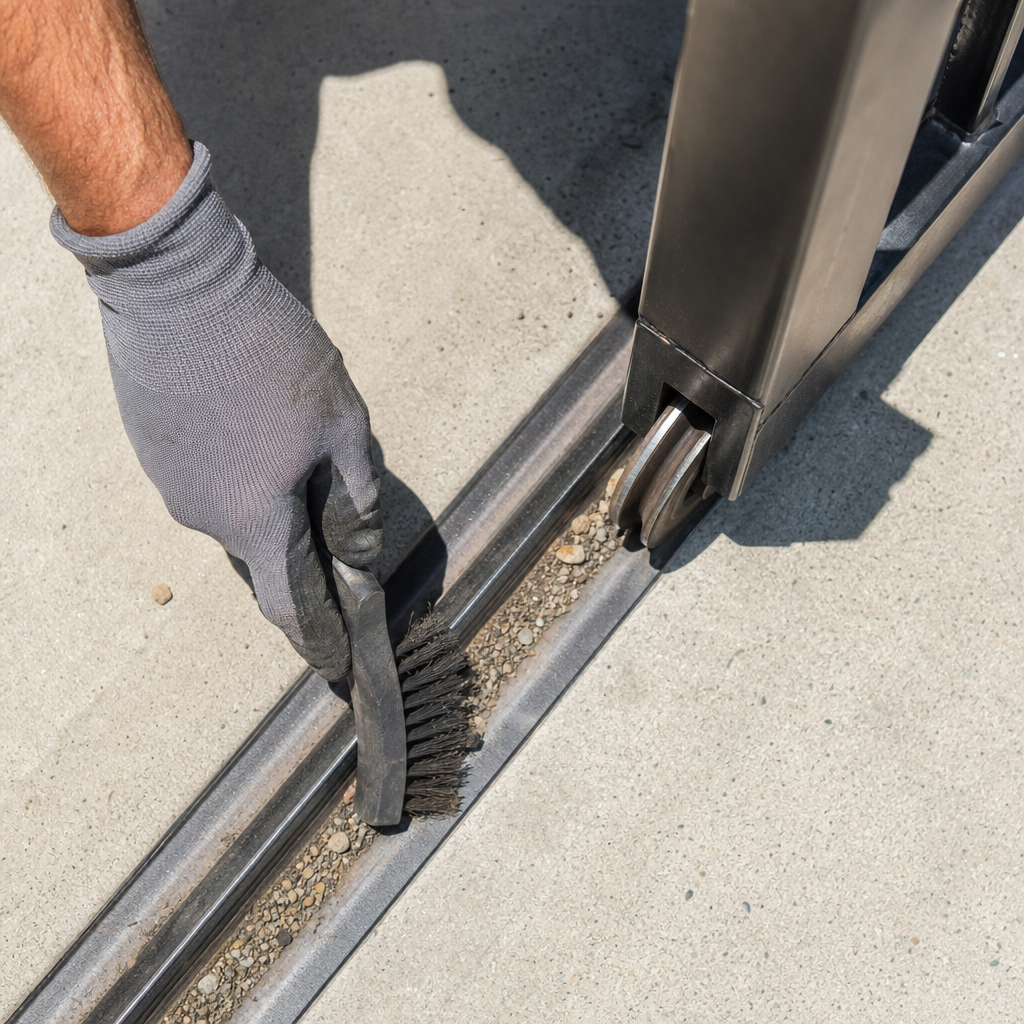
- Check the physical pathway: Look for gravel, twigs, or debris packed into slide tracks, and check that positive mechanical stops and guide rollers are intact and clear.
DIY Checks vs. Professional Gate Repair
Property owners can safely handle surface-level maintenance, such as changing clicker batteries, wiping sensor lenses, and clearing track debris. However, working with high-voltage feeds, heavy gate alignment, and internal control board diagnostics requires professional service.
| Service Task | DIY Homeowner | General Handyman | Qualified Gate Professional |
|---|---|---|---|
| Sensor Cleaning & Battery Swap | Safe (Follow Manual) | Standard Task | Verified & Tested |
| Track Clearing & Obstruction Removal | Safe When Powered Down | Basic Maintenance | Complete Alignment Check |
| Control Board & Electrical Diagnostics | Electrical Shock Hazard | Risk of Misdiagnosis | Full Meter Diagnostics |
| Safety Reversal Calibration | Safety Hazard | Risk of Improper Setup | Calibrated to Manufacturer Specs |
1. Check Main Power, Breakers, and Ground Fault Outlets
If your operator shows zero signs of life, start at the power source. Outdoor gate operators depend on electrical circuits that can experience external interruptions.
- Reset the main gate breaker: Head to your electrical panel or dedicated sub-panel. Flip the gate operator breaker to the “Off” position, wait ten seconds, and flip it back to “On.”
- Check outdoor GFCI outlets: If the gate operator is tied into an exterior GFCI receptacle, moisture or landscape sprinklers may have tripped it. Press the “Reset” button on the outlet to restore power.
- Internal switches and fuses: Do not open electrical enclosures or attempt to inspect internal fuses unless specifically permitted by manufacturer documentation with power-isolation precautions stated. If power is reaching the unit but it does not operate, contact a qualified technician.
2. Inspect Remote Controls, Keypads, and Access Receivers
Need electric gate troubleshooting?
We’re available now - call for a fast, free estimate.
When the operator has power but refuses to respond to wireless commands, check the control accessories.
- Test multiple remotes: If one handheld clicker fails but a wall button or keypad works, replace the battery in the remote and clean any terminal corrosion.
- Check wireless keypad batteries: Outdoor keypads are subject to weather exposure. Fresh batteries often resolve intermittent keypad issues.
- Inspect the receiver antenna: Check that the external antenna wire is intact, free of pest damage, and not bent or enclosed inside a metal box, which can reduce reception range.
3. Clean and Check Safety Sensors
Automated gates often use optical safety sensors to detect obstructions. If your gate opens but refuses to close (or starts closing, stops, and reverses), the sensor circuit may be active.
- Wipe the lenses: Clean the sensor lenses using a damp microfiber cloth to remove spiderwebs, dirt, dust, or moisture.
- Check alignment indicators: Consult your manufacturer documentation to interpret sensor indicator lights and follow model-specific instructions for alignment adjustments.
- Check for sunlight glare: Direct low-angle sunlight can blind optical sensors. If the gate acts up only at certain times of day, check manufacturer options for sensor hoods or positioning adjustments.
4. Control Board and Motor Issues
If the motor hums, buzzes, or clicks when activated but the gate does not move, the issue may involve electrical components or mechanical binding.
- Thermal overload: Gate motors can shut down temporarily if internal thermal protection activates under heavy load or high ambient heat. Allow the unit to cool before testing again.
- Electrical components: Testing or replacing internal components such as capacitors, relays, and logic boards involves electrical shock hazards. Unless permitted by manufacturer instructions with complete power-isolation procedures, leave internal electrical repairs to a qualified technician.
5. Clear Tracks, Inspect Rollers, and Check Hinges
As specialists at Ironworks Gate Co. point out, automated gate operators are designed to move balanced, free-traveling gates. Mechanical drag or binding forces the operator to stop or reverse to prevent entrapment.
- Slide gate track maintenance: Clear away dirt, gravel, and debris along the track. Inspect rollers for visible damage or binding.
- Swing gate hinge alignment: Inspect hinges and mounting posts for sagging or wear that causes the gate to drag. Lubricate hinges according to manufacturer recommendations.
6. Inspect Travel Limits, Drive Mechanisms, and Positive-Stops
Need electric gate troubleshooting?
We’re available now - call for a fast, free estimate.
When a gate stops short of fully opening or closing, travel limits or physical components may need service.
- Check limit settings: Limit switches or sensors communicate open and close positions to the control board. Consult manufacturer guidelines to adjust limits if the gate stops out of position.
- Check drive chain or belt tension: Maintain chain or belt tension according to manufacturer specifications to avoid excessive slack or undue load on operator bearings.
- Inspect positive mechanical stops: Physical positive-stops prevent the gate from overtraveling or rolling off its track if electrical limits fail. In a California workplace review, failed or missing end-stops or positive-stops were involved in 15 of 31 incidents with analyzed cause data from 1990 through 2005, or 48 percent. Ensure all positive-stops are secure, intact, and unobstructed.
7. How to Use the Manual Release During a Power Outage
When power is interrupted, open your gate manually by following model-specific safety steps.
- Use the manufacturer-supplied release: Use only the manufacturer-supplied key, lever, or mechanism designated for manual operation. Never dismantle the operator housing or drive hardware to force the gate open.
- Disengage the drive: Follow the manufacturer instructions to disengage the drive mechanism.
- Move the gate carefully: Push the gate open slowly and carefully, keeping hands clear of pinch points, hinges, and rollers. Never force a stuck gate. If the gate resists manual movement, stop and call a professional.
- Re-engage the system: Follow manufacturer instructions to re-engage the manual release before restoring power or operating the motor.
8. Gate Automation Systems: Maintenance and Replacement Parts
Automated gate systems rely on matched components designed to operate together safely.
- Matched replacement parts: Use manufacturer-specified replacement boards and accessories to ensure proper operation of current-monitoring and safety reversal systems.
- Vehicle loops and safety edges: Periodically check vehicle detection loops and edge sensors to ensure they respond properly to obstructions and do not hold the gate open continuously.
What Does Electric Gate Troubleshooting and Repair Involve?
Repair scopes vary depending on whether the issue stems from power interruptions, physical obstructions, sensor alignment, or mechanical wear.[2]
| Repair Service | Typical Service Scope |
|---|---|
| Diagnostic & Safety Inspection | Electrical input test, safety sensor check, force evaluation, and structural inspection |
| Track, Wheel & Hinge Service | Clearing obstructions, replacing worn rollers, and leveling hinges |
| Electrical Component Service | Testing and replacing manufacturer-approved capacitors, fuses, and wiring connections |
| Control Board & Receiver Service | Installing OEM logic boards, configuring wiring terminals, and programming controls |
| Full Operator Replacement | Removing failed operators, mounting new units, and setting up all safety devices |
Frequently Asked Questions About Electric Gate Troubleshooting
Why does my gate open a few feet and stop?
This is commonly caused by an active safety sensor circuit or excessive mechanical resistance along the track or hinges. When the operator detects an obstruction or binding force, it halts or reverses movement to prevent injury or damage.
How do I reset an automatic gate opener system?
The exact reset procedure depends on the opener model. Clear the gate path, follow the manufacturer instructions, and do not bypass safety devices.
What causes an electric driveway gate to stop halfway?
Technicians at Ironworks Gate Co. explain that mid-travel stops typically indicate physical track obstructions, mechanical resistance from worn rollers or hinges, misaligned travel limits, or safety sensor interruptions.
How do you manually open an electric gate during a power outage?
Use only the manufacturer-supplied release key or mechanism according to the operator manual. Disengage the drive, move the gate slowly and carefully by hand without forcing it, and never dismantle the operator.
Why are my automatic gate safety sensors flashing or clicking?
Flashing or clicking safety sensors often signal an obstructed beam path, optical misalignment, dirty lenses, or power disruption. Refer to the manufacturer manual for model-specific indicator light meanings.
When should I call a professional gate technician instead of attempting DIY repairs?
Call a qualified gate professional if the gate can close unexpectedly, has failed safety devices, is difficult to move manually, or has damaged structural or electrical parts. Internal control board work, high-voltage wiring, and heavy structural repairs should always be handled by trained technicians.
Need electric gate troubleshooting?
We’re available now - call for a fast, free estimate.
Sources
- [PDF] 2024-11-20-COPF-CODD-Hummingbird-Alliance-Meeting-Log.pdf – cpsc.gov (2024)
- [PDF] Petition File No. 605 Cal/OSHA Evaluation – dir.ca.gov (2024)
- New Safety Standard for Automatic Security Gates Helps … – cpsc.gov (2000)
- Gates and Enclosures – cpsc.gov (2018)
Related reading: Automatic Gate Repair – 10% Off & Free Estimate – On-Site in 60 Minutes
Related reading: Gate Safety Sensors – Call Now-10% Off – Same-Day Service – Free Estimate
Related reading: Gate Opens and Closes Immediately – Call Now-10% Off – Same-Day Service – Free Estimate
Frequently Asked Questions
What should I do if the gate motor hums or clicks but will not move after a reset?
A humming motor without movement usually indicates a blown start capacitor, damaged drive relay, or internal gearbox seizure. If allowing the unit to cool does not resolve the issue, contact Ironworks Gate Co. for professional meter diagnostics and component testing.
How can I prevent outdoor weather and moisture from repeatedly tripping my gate's GFCI circuit?
Frequent GFCI trips are typically caused by water intrusion in underground conduit, unsealed junction boxes, or degraded wire insulation. Technicians from Ironworks Gate Co. can isolate grounding faults, reseal outdoor enclosures, and ensure all electrical feeds are weather-protected.
What is included in a professional electric gate diagnostic inspection?
A professional inspection covers incoming electrical supply testing, logic board diagnostics, safety sensor alignment, force calibration, and structural hardware checks. Ironworks Gate Co. provides a comprehensive on-site assessment with an upfront written estimate before performing repairs.
About the author
 |
Marcus Avery Marcus Avery is a seasoned access control specialist with over 12 years of experience in the automated gate industry. Holding a degree in Electrical Engineering from California State Polytechnic University, Pomona, he brings a strong technical background to his writing on gate repair and maintenance. He aims to provide homeowners and property managers with clear, practical advice on troubleshooting common gate issues and understanding pricing structures. |
Gate not opening, off track, or opener dead?
We’re available now - call for a fast, free estimate.
Call Now - Free Estimate